Mirth Connect is the most widely deployed open-source healthcare integration engine. It handles HL7v2 message parsing, FHIR transformations, and channel-based routing with a visual interface that integration analysts can manage without writing code. For organizations processing a few thousand messages per day across a handful of interfaces, Mirth does the job.
But when message volume crosses 50,000 messages per day, when you need real-time analytics on clinical events, or when multiple downstream systems need the same data at different cadences, Mirth's architecture starts to show strain. Its file-based internal queue, single-JVM processing model, and synchronous channel chains were not designed for high-throughput event streaming.
This is where Apache Kafka enters the architecture. Kafka is a distributed event streaming platform that handles millions of messages per second with sub-millisecond latency, persistent event logs, and consumer group patterns that let multiple services process the same data independently.
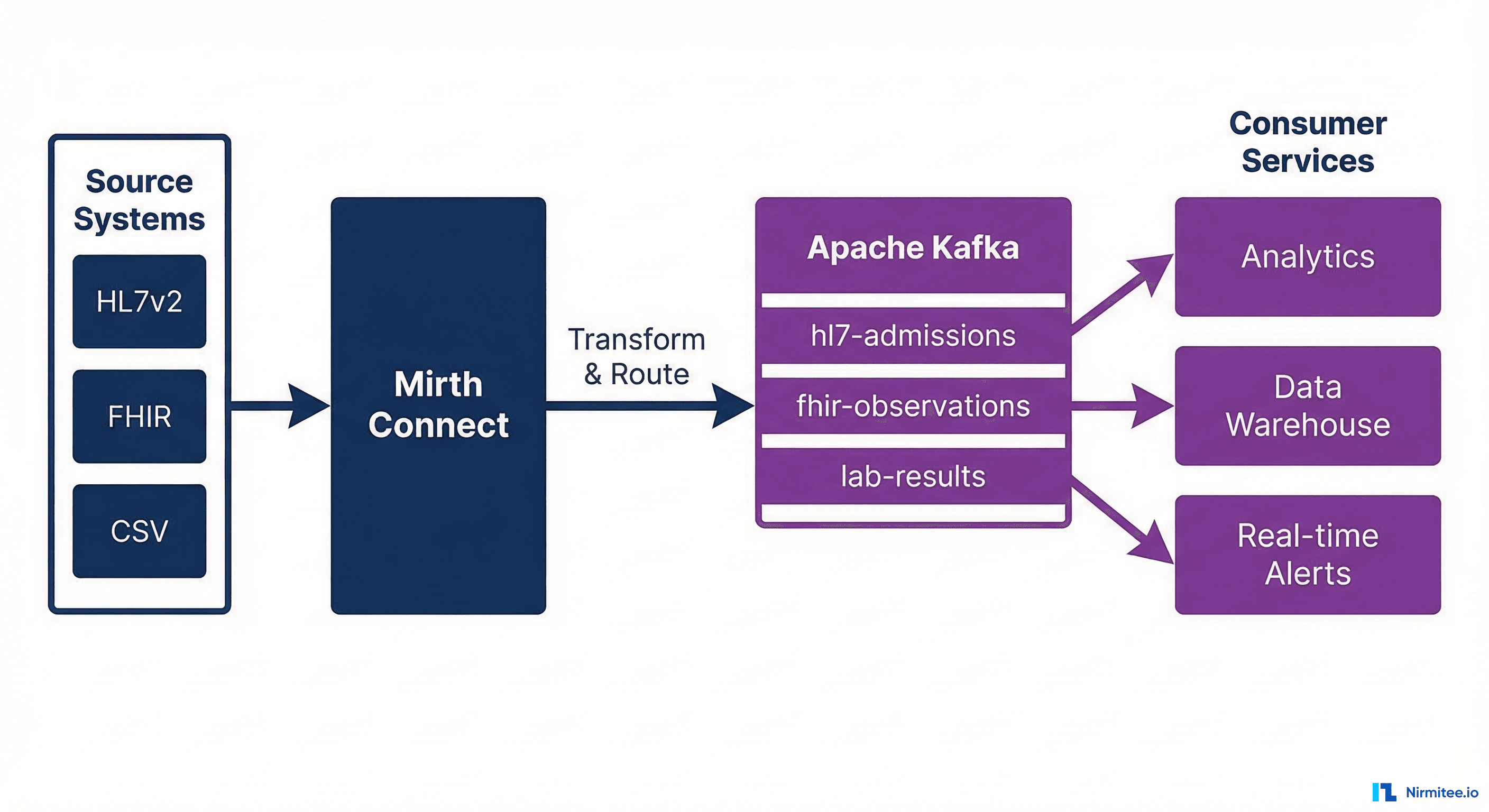
When to Add Kafka to Your Mirth Architecture
Not every healthcare integration needs Kafka. Here are the specific scenarios where the added complexity pays off:
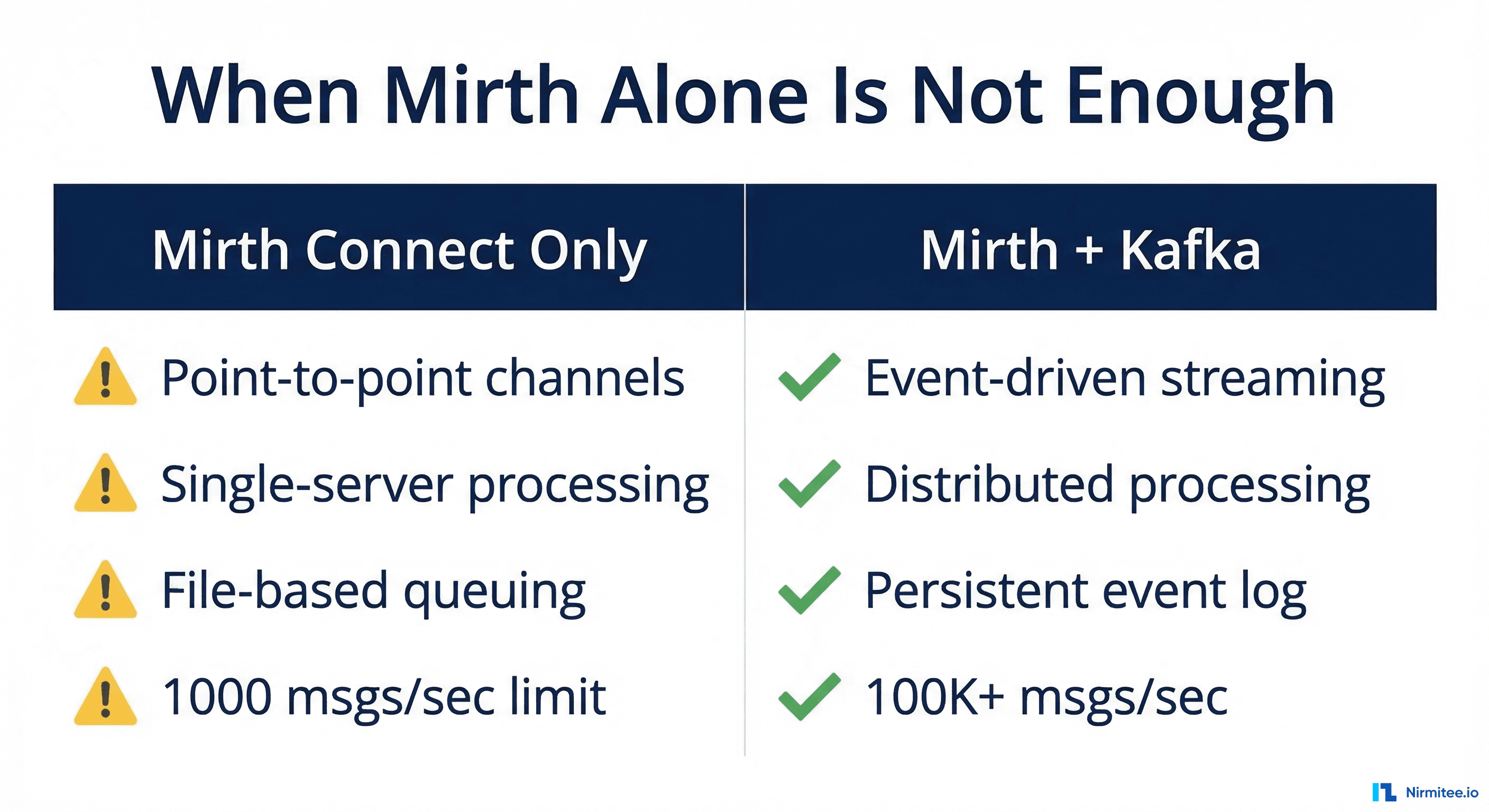 Mirth Connect alone is not enough comparison" width="1200">
| Scenario | Mirth Only | Mirth + Kafka |
|---|---|---|
| Daily message volume under 10K | Sufficient | Over-engineered |
| Volume over 50K with multiple consumers | Bottleneck risk | Optimal |
| Real-time clinical event streaming | Polling-based delays | Sub-second delivery |
| Replay historical messages for debugging | Not possible (messages consumed) | Full event log replay |
| Multiple systems need same data | Duplicate channels or database polling | Consumer groups |
| Cross-facility data federation | Complex multi-server setup | Centralized event bus |
| Compliance audit trail | Database logging only | Immutable event log |
The decision point is straightforward: if you have one source and one destination, Mirth is enough. If you have one source and many destinations, or need event replay, audit trails, or real-time streaming, add Kafka.
Architecture: How Mirth and Kafka Work Together
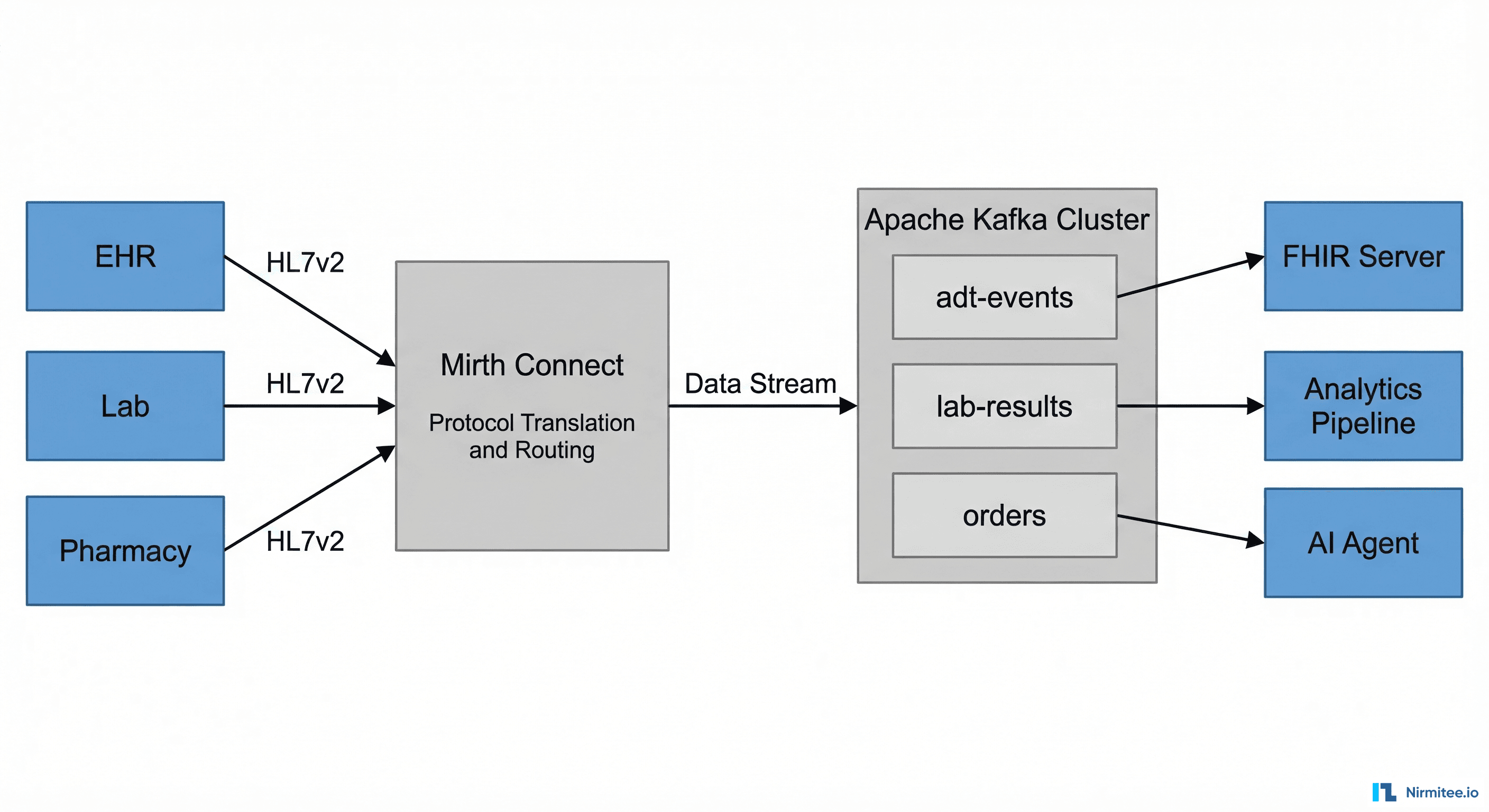
The integration pattern positions Mirth as the protocol adapter and transformer and Kafka as the event backbone. Mirth handles the messy work of parsing HL7v2 messages, validating content, transforming to FHIR, and normalizing data. Kafka handles distribution, persistence, and fan-out to consumer services.
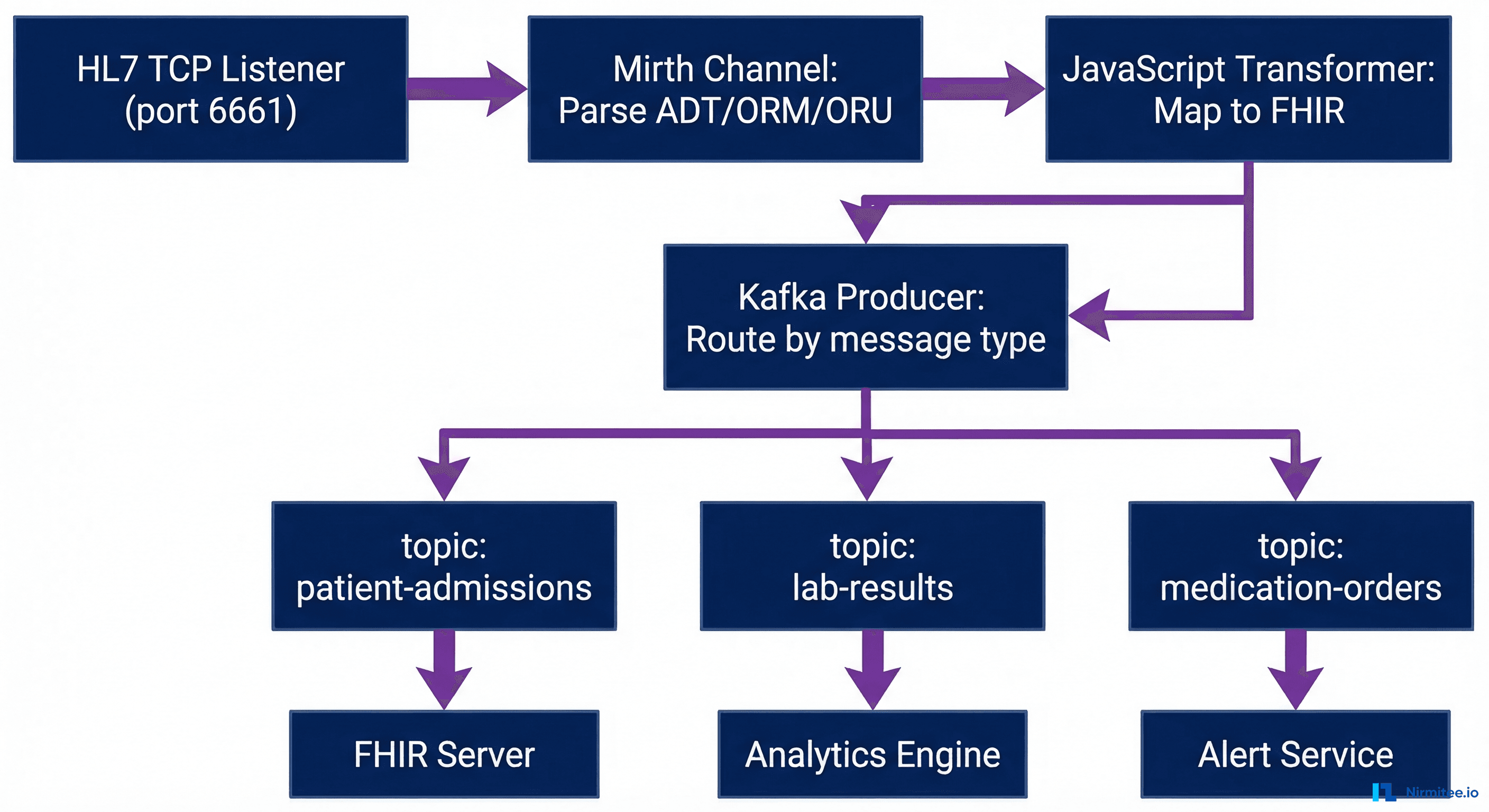
Layer 1: Mirth Connect as the Ingestion Layer
Mirth receives messages from source systems through its native connectors:
- TCP/MLLP Listener — For HL7v2 ADT, ORM, ORU messages from legacy EMR systems
- HTTP/REST Listener — For FHIR bundles from modern applications
- Database Reader — For polling EHR staging tables
- File Reader — For batch CSV or CDA document imports
Each source gets its own Mirth channel. The channel performs validation, transformation, and enrichment before producing to Kafka.
Layer 2: Kafka as the Event Backbone
Kafka topics are organized by clinical domain:
# Topic naming convention: {domain}.{event-type}.{version}
patient.admission.v1        # ADT^A01 events
patient.discharge.v1        # ADT^A03 events
patient.transfer.v1         # ADT^A02 events
lab.result.v1               # ORU^R01 results
lab.order.v1                # ORM^O01 orders
medication.order.v1         # RDE^O11 prescriptions
medication.administration.v1 # RAS^O17 administrations
document.clinical-note.v1   # MDM^T02 documents
Each topic has a retention period of 7 days by default (configurable up to indefinite), allowing consumers to replay events for debugging or reprocessing. Topics are partitioned by patient ID to ensure message ordering per patient.
Layer 3: Consumer Services
Downstream systems consume from Kafka topics using consumer groups. Each consumer group processes messages independently:
- FHIR Server Sync — Consumes all patient and clinical events to maintain a FHIR R4 repository
- Analytics Pipeline — Consumes lab results and vital signs for population health dashboards
- Real-time Alerting — Consumes critical lab values and generates notifications for clinical decision support
- Data Warehouse ETL — Consumes all events in batch windows for reporting
- Audit Service — Consumes every message for HIPAA compliance logging
Implementing the Mirth-to-Kafka Producer
The Mirth side of the integration uses a JavaScript Writer destination to produce messages to Kafka. Here is a production-ready channel configuration.
Mirth Channel: HL7v2 to Kafka Producer
// Mirth Connect - Destination: Kafka Producer
// Channel: HL7v2-to-Kafka-Router

// Step 1: Extract routing metadata from the HL7 message
var msgType = msg['MSH']['MSH.9']['MSH.9.1'].toString();
var triggerEvent = msg['MSH']['MSH.9']['MSH.9.2'].toString();
var patientId = '';

if (msg['PID'] && msg['PID']['PID.3']) {
    patientId = msg['PID']['PID.3']['PID.3.1'].toString();
}

// Step 2: Determine the Kafka topic based on message type
var topicMap = {
    'ADT^A01': 'patient.admission.v1',
    'ADT^A03': 'patient.discharge.v1',
    'ADT^A02': 'patient.transfer.v1',
    'ORU^R01': 'lab.result.v1',
    'ORM^O01': 'lab.order.v1',
    'RDE^O11': 'medication.order.v1'
};

var topic = topicMap[msgType + '^' + triggerEvent] || 'unrouted.messages.v1';

// Step 3: Build the Kafka message envelope
var kafkaMessage = {
    'metadata': {
        'messageId': connectorMessage.getMessageId(),
        'timestamp': DateUtil.getCurrentDate('yyyy-MM-dd\'T\'HH:mm:ss.SSSZ'),
        'source': channelName,
        'messageType': msgType + '^' + triggerEvent,
        'patientId': patientId
    },
    'payload': {
        'format': 'HL7v2',
        'version': msg['MSH']['MSH.12']['MSH.12.1'].toString(),
        'raw': connectorMessage.getRawData()
    }
};

// Step 4: Produce to Kafka
var ProducerRecord = java.lang.Class.forName('org.apache.kafka.clients.producer.ProducerRecord');
var record = new Packages.org.apache.kafka.clients.producer.ProducerRecord(
    topic,
    patientId,  // Key: ensures patient message ordering
    JSON.stringify(kafkaMessage)
);

globalMap.get('kafkaProducer').send(record);
logger.info('Produced to ' + topic + ' for patient ' + patientId);
Kafka Producer Configuration
# kafka-producer.properties for healthcare workloads
bootstrap.servers=kafka-1:9092,kafka-2:9092,kafka-3:9092
key.serializer=org.apache.kafka.common.serialization.StringSerializer
value.serializer=org.apache.kafka.common.serialization.StringSerializer

# Durability: wait for all replicas to acknowledge
acks=all
retries=3
retry.backoff.ms=1000

# Exactly-once semantics (Kafka 3.x+)
enable.idempotence=true
transactional.id=mirth-producer-01

# Performance tuning for healthcare message sizes
batch.size=65536
linger.ms=10
buffer.memory=67108864
max.request.size=10485760

# Security: TLS + SASL for HIPAA
security.protocol=SASL_SSL
ssl.truststore.location=/opt/kafka/ssl/truststore.jks
ssl.truststore.password=${TRUSTSTORE_PASSWORD}
sasl.mechanism=SCRAM-SHA-256
sasl.jaas.config=org.apache.kafka.common.security.scram.ScramLoginModule required username="mirth-producer" password="${KAFKA_PASSWORD}";
FHIR Streaming: Transforming HL7v2 to FHIR in the Pipeline
A common pattern is to transform HL7v2 messages to FHIR R4 resources within the Mirth transformer before producing to Kafka. This means downstream consumers receive clean FHIR bundles rather than raw HL7v2.
HL7v2 ADT to FHIR Patient Transform
// Mirth Transformer: ADT^A01 -> FHIR Patient Resource
var fhirPatient = {
    "resourceType": "Patient",
    "identifier": [{
        "system": "http://hospital.example.org/mrn",
        "value": msg['PID']['PID.3']['PID.3.1'].toString()
    }],
    "name": [{
        "family": msg['PID']['PID.5']['PID.5.1'].toString(),
        "given": [msg['PID']['PID.5']['PID.5.2'].toString()]
    }],
    "gender": mapGender(msg['PID']['PID.8'].toString()),
    "birthDate": formatHL7Date(msg['PID']['PID.7'].toString())
};

function mapGender(hl7Gender) {
    var genderMap = { 'M': 'male', 'F': 'female', 'U': 'unknown', 'O': 'other' };
    return genderMap[hl7Gender] || 'unknown';
}

function formatHL7Date(hl7Date) {
    if (hl7Date.length >= 8) {
        return hl7Date.substring(0, 4) + '-' + hl7Date.substring(4, 6) + '-' + hl7Date.substring(6, 8);
    }
    return null;
}

channelMap.put('fhirResource', JSON.stringify(fhirPatient));
Production Deployment: Infrastructure and Sizing
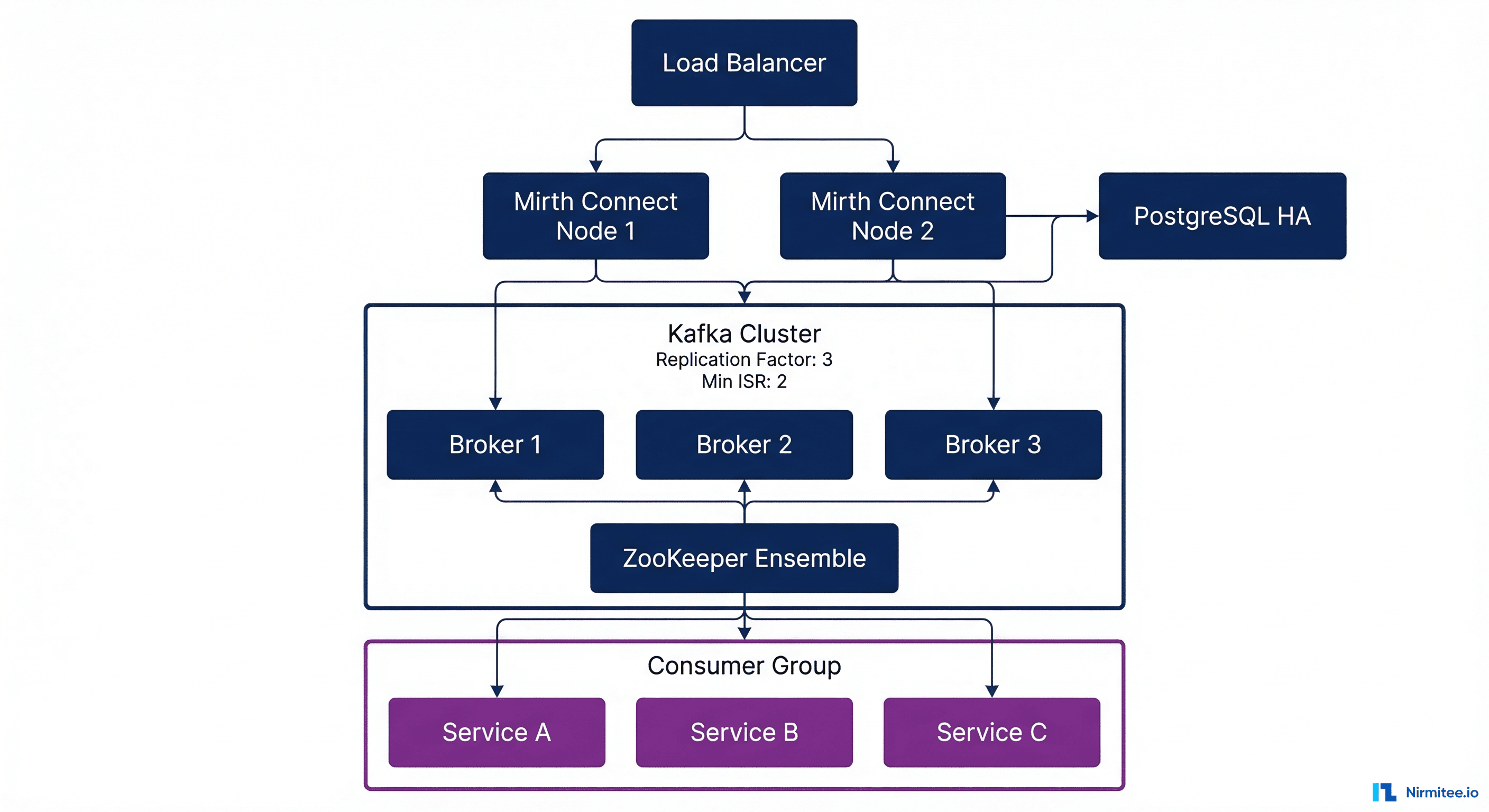
A production healthcare integration platform running Mirth + Kafka requires careful infrastructure planning.
Sizing Guidelines
| Component | Small (10K msgs/day) | Medium (100K msgs/day) | Large (1M+ msgs/day) |
|---|---|---|---|
| Mirth Connect nodes | 1 (4 CPU, 8GB RAM) | 2 HA (8 CPU, 16GB each) | 4+ behind load balancer |
| Kafka brokers | 3 (4 CPU, 16GB RAM, 500GB SSD) | 3-5 (8 CPU, 32GB, 1TB SSD) | 6+ (16 CPU, 64GB, 2TB NVMe) |
| ZooKeeper / KRaft | 3 nodes (2 CPU, 4GB) | 3 nodes (4 CPU, 8GB) | 5 nodes (4 CPU, 8GB) |
| PostgreSQL (Mirth DB) | 1 primary (4 CPU, 16GB) | Primary + replica | Primary + 2 replicas |
| Topic partitions | 3 per topic | 6-12 per topic | 12-24 per topic |
| Replication factor | 3 | 3 | 3 (min.insync.replicas=2) |
Docker Compose for Development
version: "3.8"
services:
  mirth:
    image: nextgenhealthcare/connect:4.5.0
    ports:
      - "8443:8443"   # Admin console
      - "6661:6661"   # HL7 TCP listener
    volumes:
      - ./mirth-config:/opt/connect/appdata
      - ./kafka-libs:/opt/connect/custom-lib
    environment:
      - DATABASE=postgres
      - DATABASE_URL=jdbc:postgresql://postgres:5432/mirthdb
      - DATABASE_USERNAME=mirth
      - DATABASE_PASSWORD=${MIRTH_DB_PASSWORD}
    depends_on:
      - postgres
      - kafka

  kafka:
    image: confluentinc/cp-kafka:7.6.0
    ports:
      - "9092:9092"
    environment:
      KAFKA_NODE_ID: 1
      KAFKA_PROCESS_ROLES: broker,controller
      KAFKA_CONTROLLER_QUORUM_VOTERS: 1@kafka:9093
      KAFKA_LISTENERS: PLAINTEXT://0.0.0.0:9092,CONTROLLER://0.0.0.0:9093
      KAFKA_ADVERTISED_LISTENERS: PLAINTEXT://kafka:9092
      KAFKA_CONTROLLER_LISTENER_NAMES: CONTROLLER
      KAFKA_LISTENER_SECURITY_PROTOCOL_MAP: CONTROLLER:PLAINTEXT,PLAINTEXT:PLAINTEXT
      KAFKA_LOG_DIRS: /var/lib/kafka/data
      KAFKA_AUTO_CREATE_TOPICS_ENABLE: "false"
      KAFKA_NUM_PARTITIONS: 6
      KAFKA_DEFAULT_REPLICATION_FACTOR: 1
    volumes:
      - kafka-data:/var/lib/kafka/data

  postgres:
    image: postgres:16
    environment:
      POSTGRES_DB: mirthdb
      POSTGRES_USER: mirth
      POSTGRES_PASSWORD: ${MIRTH_DB_PASSWORD}
    volumes:
      - pgdata:/var/lib/postgresql/data

volumes:
  kafka-data:
  pgdata:
Monitoring the Mirth + Kafka Pipeline
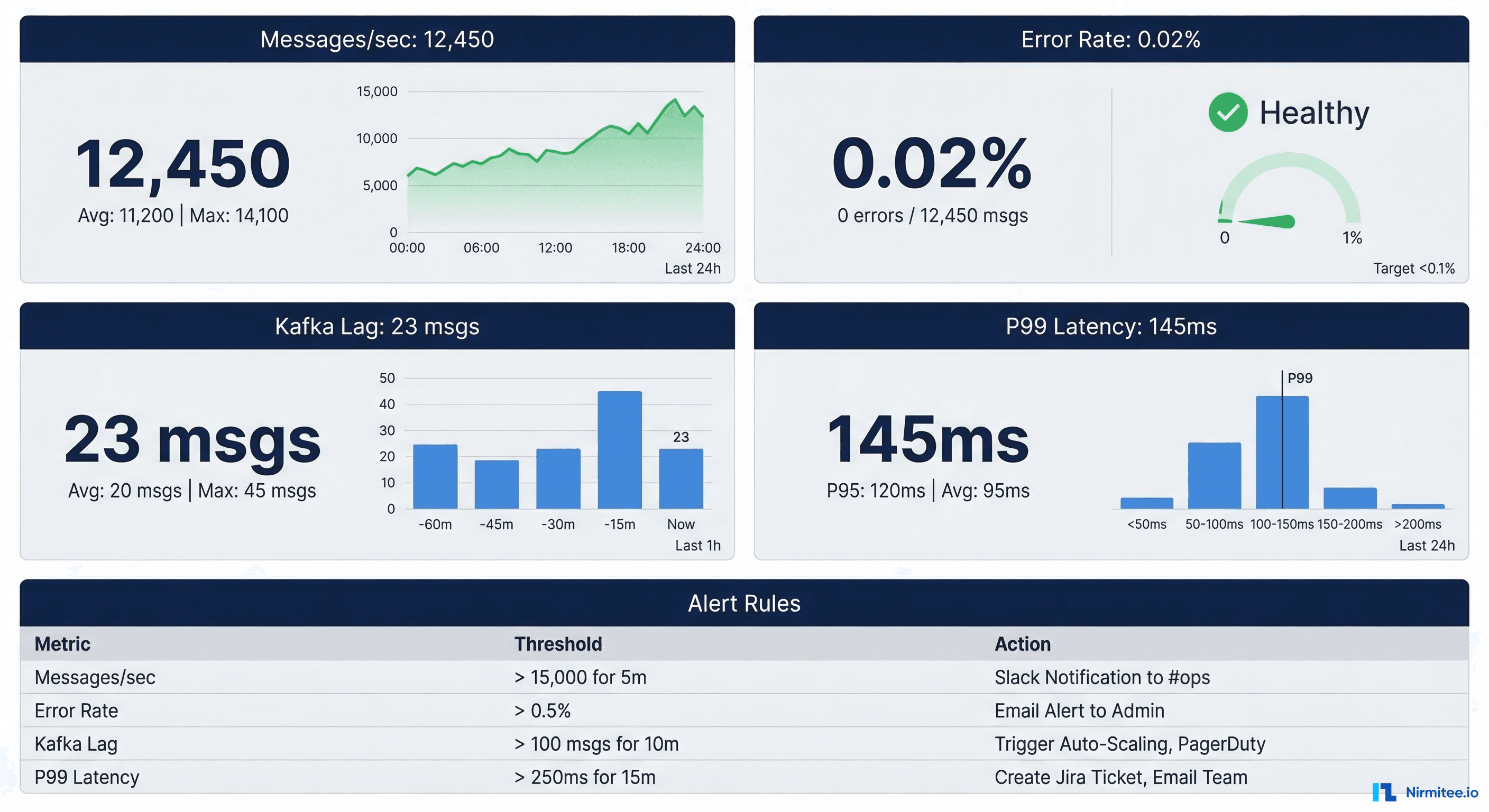
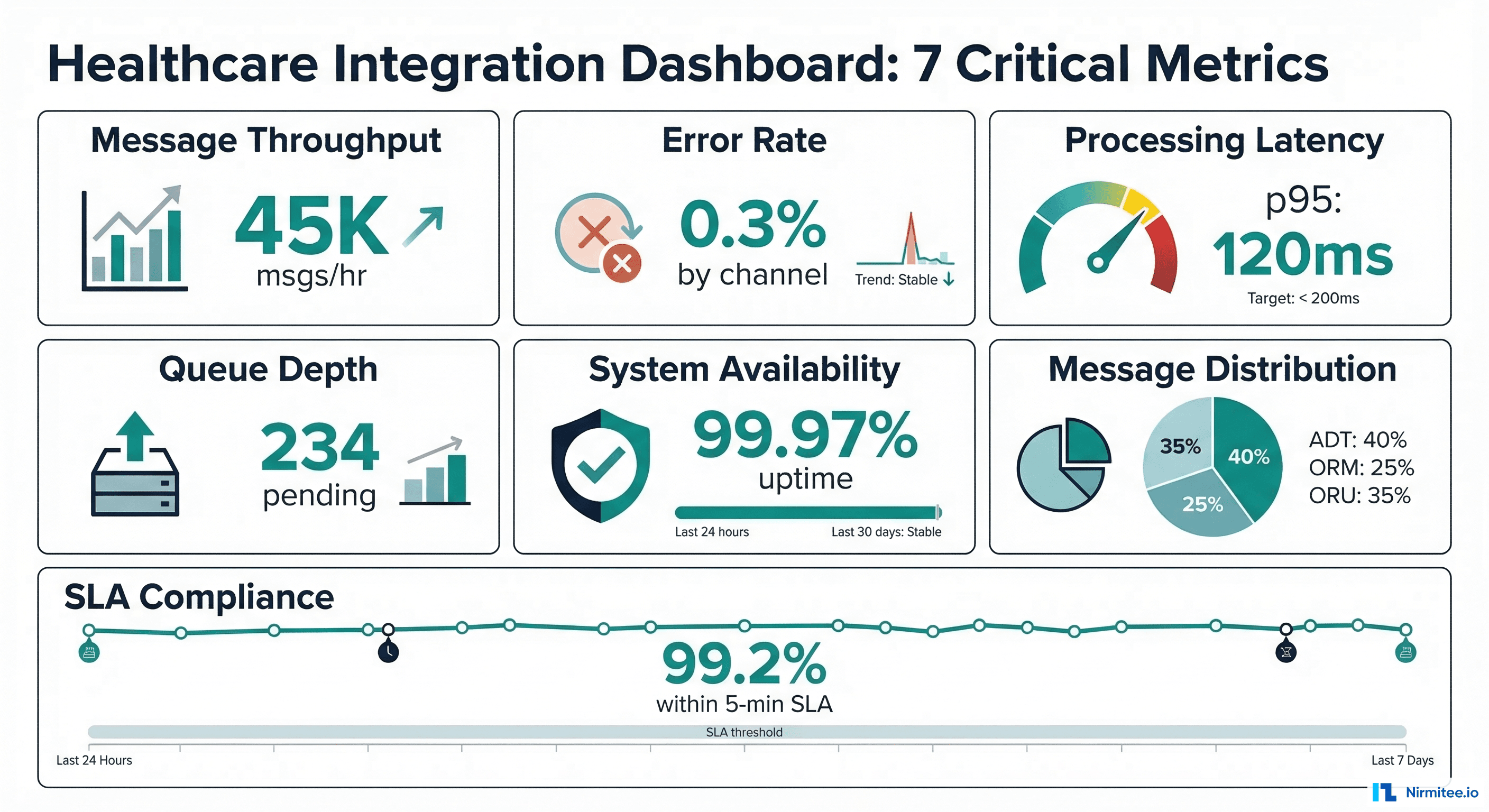
Production healthcare integrations require comprehensive monitoring. See our full guide on Mirth Connect monitoring in production for deeper coverage. Here are the critical metrics for the combined Mirth + Kafka architecture:
Key Metrics to Track
| Metric | Source | Alert Threshold | Why It Matters |
|---|---|---|---|
| Message throughput (msgs/sec) | Mirth + Kafka | 50% below baseline | Indicates upstream system failure or network issue |
| Consumer lag | Kafka | > 1000 messages | Consumer not keeping up; data freshness at risk |
| Error rate | Mirth channels | > 0.1% of messages | Transform failures or validation rejections |
| P99 end-to-end latency | Custom instrumentation | > 5 seconds | Clinical workflows may depend on timely data |
| Disk usage on brokers | Kafka | > 80% capacity | Retention policy needs adjustment or capacity increase |
| Mirth queue depth | Mirth JMX | > 500 messages | Channel processing bottleneck |
Error Handling and Dead Letter Queues
Healthcare messages cannot be silently dropped. Every message must either be processed successfully or routed to a dead letter queue (DLQ) for manual review.
// Mirth Error Handler: Route failed messages to DLQ topic
// Place in channel postprocessor

if (responseStatus == SENT) {
    // Message processed successfully
    return;
}

var dlqMessage = {
    "metadata": {
        "originalMessageId": connectorMessage.getMessageId(),
        "channelName": channelName,
        "errorTimestamp": DateUtil.getCurrentDate("yyyy-MM-dd'T'HH:mm:ss.SSSZ"),
        "errorType": responseStatusMessage,
        "retryCount": 0
    },
    "originalPayload": connectorMessage.getRawData(),
    "error": {
        "message": responseErrorMessage,
        "stackTrace": responseStatusMessage
    }
};

var record = new Packages.org.apache.kafka.clients.producer.ProducerRecord(
    "dlq.integration-errors.v1",
    connectorMessage.getMessageId().toString(),
    JSON.stringify(dlqMessage)
);

globalMap.get("kafkaProducer").send(record);
logger.error("Message sent to DLQ: " + connectorMessage.getMessageId());
Security Hardening for HIPAA Compliance
The Mirth + Kafka pipeline handles PHI (Protected Health Information) and must meet HIPAA Technical Safeguard requirements:
- Encryption in transit — TLS 1.2+ between all components: Mirth-to-Kafka, Kafka broker-to-broker, and consumer-to-Kafka. Configure
security.protocol=SSLorSASL_SSL. - Encryption at rest — Enable disk encryption on Kafka broker volumes and PostgreSQL data directories. Use LUKS on Linux or cloud provider encryption (AWS EBS encryption, Azure Disk Encryption).
- Access control — Kafka ACLs restrict which principals can produce to or consume from each topic. Use SASL/SCRAM or mTLS for authentication.
- Audit logging — Enable Kafka authorizer logging to track all topic access. Integrate with your SIEM for HIPAA audit requirements.
- Network segmentation — Kafka brokers and Mirth servers should run in a private subnet with no direct internet access. Use VPN or private link for cross-facility communication.
- Data retention policy — Set topic retention to match your organization's data retention requirements. For HIPAA, consider 7-year retention for audit topics.
Performance Tuning: Achieving Sub-Second Latency
Healthcare workflows like sepsis alerting and critical lab notifications demand sub-second end-to-end latency from HL7v2 message receipt to downstream notification. Achieving this requires tuning at every layer of the stack.
Mirth Connect Tuning
- Thread pool sizing — Set the channel's "Maximum Processing Threads" to match your CPU core count. For an 8-core server processing ADT messages, 8 threads typically saturate the CPU without excessive context switching.
- Disable message pruning during peak hours — Mirth's database pruner competes for PostgreSQL connections. Schedule pruning for off-peak windows using the built-in Data Pruner plugin.
- Use the preprocessor for filtering — Reject messages that do not match expected patterns in the preprocessor script rather than the transformer. This avoids allocating transformer resources for messages you will discard.
- Connection pooling — For database-backed destinations, configure HikariCP pool sizes in the Mirth server configuration to avoid connection creation overhead on every message.
- JVM tuning — Allocate 4-8GB heap for Mirth with G1GC garbage collector. Set
-XX:MaxGCPauseMillis=50to minimize GC pause impact on message processing.
Kafka Tuning for Healthcare Workloads
- Partition strategy — Partition by patient ID (MRN) to guarantee message ordering per patient. Use a hash-based partitioner to distribute patients evenly across partitions. Avoid too many partitions per topic — 6 to 12 is optimal for most healthcare workloads.
- Compression — Enable LZ4 compression on producers (
compression.type=lz4). HL7v2 messages compress well due to repetitive delimiters, typically achieving 60-70% compression ratios. - Batch size and linger — For latency-sensitive topics like critical lab alerts, set
linger.ms=0a small batch size. For high-throughput topics like ADT messages,linger.ms=10a 64KB batch size improves throughput without a meaningful latency impact. - Consumer fetch tuning — Set
fetch.min.bytes=1andfetch.max.wait.ms=100for latency-sensitive consumers. This ensures consumers process messages within 100ms of production. - Replication and durability — Use
acks=allandmin.insync.replicas=2for all healthcare topics. The slight latency increase (typically 2-5ms) is negligible compared to the data durability guarantee required for PHI.
Migration Strategy: Adding Kafka to an Existing Mirth Deployment
Most organizations already have a running Mirth deployment when they decide to add Kafka. Here is a phased migration approach that avoids downtime.
Phase 1: Shadow Mode (Weeks 1-4)
Add Kafka as an additional destination on existing Mirth channels without removing the original destinations. Both the legacy destination and Kafka receive every message. Downstream Kafka consumers read from topics but do not take action. This validates that the Kafka pipeline receives every message with correct content.
Phase 2: Parallel Processing (Weeks 5-8)
Enable Kafka consumers for non-critical workloads first: analytics pipelines, audit logging, and reporting. The legacy Mirth destinations continue handling clinical workflows. Monitor both paths and compare output to verify consistency.
Phase 3: Cutover (Weeks 9-12)
Switch clinical consumers to the Kafka pipeline one at a time. Start with the lowest-risk consumer (typically the data warehouse ETL) and progress to real-time clinical alerting last. Keep the legacy Mirth destinations active but disabled, ready to re-enable if issues arise.
Phase 4: Decommission (Week 13+)
After two weeks of stable operation on the Kafka pipeline, remove the legacy Mirth destinations. Archive the channel configurations for rollback documentation. Update your disaster recovery runbooks to reflect the new architecture.
- Create a comprehensive message inventory — catalog every HL7v2 message type, source, destination, and transformation in your current Mirth deployment
- Design Kafka topic taxonomy aligned with clinical domains rather than source systems
- Build automated integration tests that compare message output between legacy and Kafka paths
- Train your on-call team on Kafka operational procedures before cutover
- Document consumer group management and monitoring procedures
Real-World Performance: What We See in Production
Across our healthcare integration deployments, here are typical performance numbers for the Mirth + Kafka architecture:
| Metric | Before (Mirth Only) | After (Mirth + Kafka) |
|---|---|---|
| Peak throughput | 1,200 msgs/sec | 45,000+ msgs/sec |
| P99 end-to-end latency | 3.2 seconds | 280ms |
| Message replay capability | None | Full 7-day replay |
| Consumer count per data stream | 1 (point-to-point) | 6+ independent consumers |
| Recovery time from failure | 15-30 minutes manual | Automatic failover, under 30 seconds |
| Storage efficiency | PostgreSQL only | Kafka log + cold storage tier |
These numbers come from a multi-hospital health system processing ADT, lab, pharmacy, and radiology messages across 12 facilities. The transition from Mirth-only to Mirth + Kafka took 14 weeks, including the shadow mode validation period.
Working with Nirmitee on Healthcare Integration Architecture
At Nirmitee, we have designed and deployed Mirth + Kafka integration platforms for healthcare organizations processing millions of messages daily. Our team brings deep expertise in healthcare integration architecture, Mirth Connect high availability, and avoiding common integration mistakes.
Whether you are scaling an existing Mirth deployment or designing a greenfield event-driven architecture, we can help you build a platform that handles enterprise-grade throughput with healthcare-grade reliability. Contact our team to discuss your integration requirements.
Struggling with healthcare data exchange? Our Healthcare Interoperability Solutions practice helps organizations connect clinical systems at scale. We also offer specialized Healthcare Software Product Development services. Talk to our team to get started.